Naturally, this one only appears when there are such participants. :)
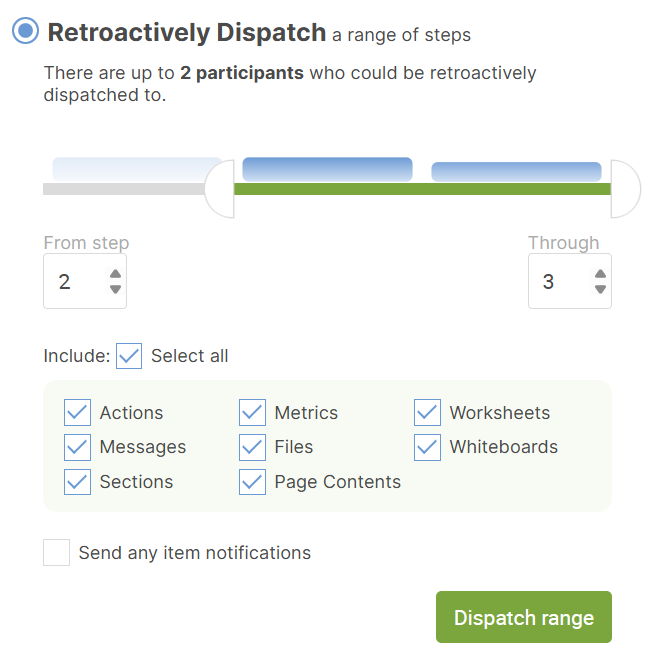
This is useful when you're making updates or additions to a Course that you've already had people go through, YET you would like those past participants to experience those changes.
You choose the range of Days or Steps you'd like to retroactively dispatch, and which types of items you'd like to include.
You can also opt in to the system sending whatever notifications are tied to whatever items get newly dispatched to those past participants. This is off by default (usually for good reason!).
Note: that participants who are currently paused will NOT be sent item notifications, even if you opt for them. They still will otherwise find whatever items newly dispatched.
A few things to note about how retroactive dispatching of the various item types works:
Sections: Newly created Sections will become newly visible to participants who already passed them the first time. If you merely make edits to these, those edits are automatically seen by all participants, there is no need to ever retroactively dispatch them.
Page Content: These work identical to Sections, retroactive dispatching will cause them to be newly displayed to participants who otherwise pass those by. Mere edits existing Page Content items do not need to be retroactively dispatched.
Worksheets: For client (i.e. not group) participants only, if you edit a Course Worksheet and then retroactively dispatch it, Worksheets your participants have already been assigned will be accordingly updated PROVIDED THAT the client has NOT YET ever saved any work on that Worksheet. (This is to ensure work on earlier versions is not lost.)
Actions: Edits to existing Course Actions will NOT be reflected in already dispatched Actions that participants have already received. Only newly added Actions will have any effect.
Whiteboards: These work identical to Actions: edits will not be retroactively copied into participant Whiteboards, only new ones will have any effect.
Messages: These too work identical to Actions: edits will not be retroactively copied into Messages as seen for participants, only new ones will have any effect.
Files: If you modify the Library File that the Course File itself points to, that will automatically be reflected in all instances of that Library File being shared (whether via Course or otherwise), thus wouldn't require a retroactive dispatch. Otherwise only newly added Course Files will be shared via retroactively dispatch.