CoachAccountable works as a liaison between you and your clients, helping to facilitate communication and updates as things unfold so that you can be more aware of (and responsive to) how things are going.
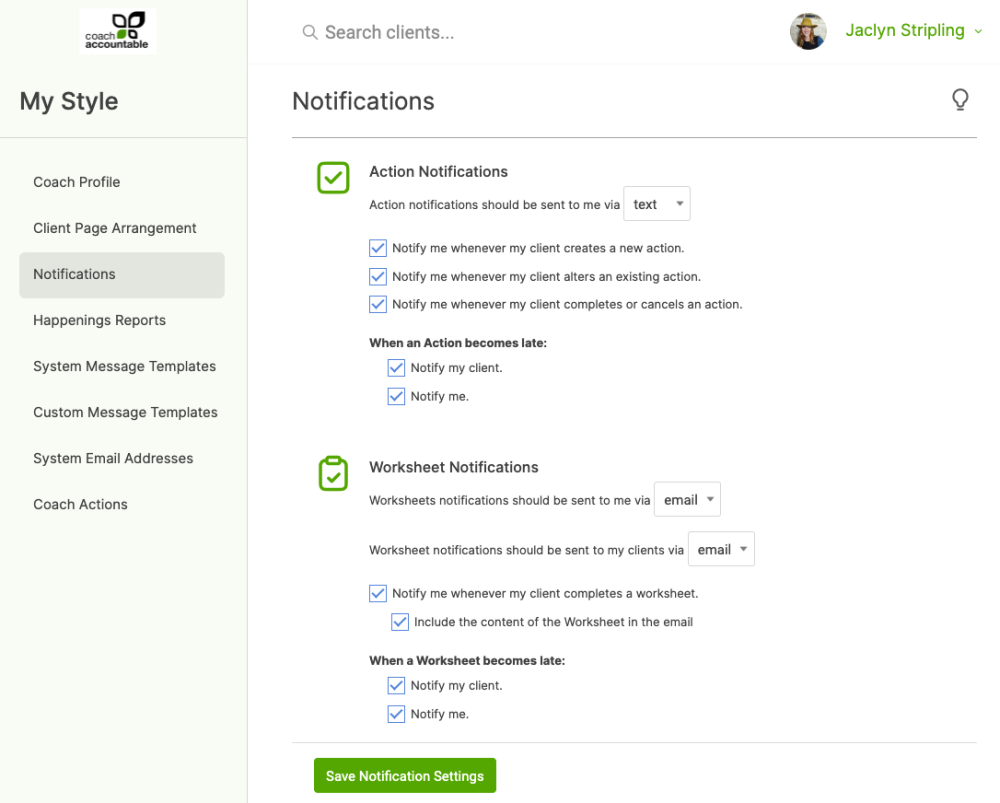
These settings let you choose the level at which CoachAccountable sends notifications to you and your clients. You can review and adjust these settings on an organizational level by going to Settings >> My Style >> Notifications.
By default, notification emails are sent to you when an item is created, altered, completed, or becomes late. You can toggle notifications on and off for these events, and you can also have notifications sent to you via SMS instead of email.
You'll see the options to set notification preferences for:
- Client Actions
- Client Worksheets
- Client Journals
- Client Agreements
- Client File Sharing
- Client Comments
- Client Invoicing
Customizing for Individual Clients
The notifications you set in your My Style page are the default that will be applied to your clients. These defaults can be overridden on a per-client basis.
To do so, bring up your client's Client Manager (click their gear icon as found in your Clients listing) and go to Settings >> Notifications.
Types of Notifications
Action Notifications
Actions are like a high-powered to-do list for your clients, and are designed to promote easy tracking and collaboration. CoachAccountable can send email notifications as things happen with Actions.
Worksheet Notifications
Worksheets are assignments that your clients are to fill out. CoachAccountable can send email notifications as things happen with Worksheets.
Journaling Notifications
CoachAccountable provides an easy way for your clients to make journal entries about whatever's going on in their coaching experience. When a client makes a journal entry, CoachAccountable can send you a notification.
Agreement Notifications
If you are using Agreements with your clients, CoachAccountable can send you a notification whenever a client submits an Agreement.
File Sharing Notifications
CoachAccountable provides an easy way to share files between you and your clients. When a client shares a file with you they are given the option to send you an email notification.
Comment Notifications
You and your clients can both post comments on any items of your coaching relationship here in CoachAccountable by doing so on the Stream tab.
CoachAccountable can send email notifications of these comments to you when your client posts a comment, and to your client when you post a comment.
Invoicing Notifications
CoachAccountable enables you to send clients invoices, schedule invoices to be sent automatically at a later date, and lets your client pay invoices online.